
End-to-end booking experience inside the Casai App
The conceptualization and implementation of the book and checkout workflows in the Casai app.
ABOUT THE COMPANY
Casai is a company that focuses on providing their guests the best customizable experience for short to mid-term stays. By owning all the apartments and designing them with different styles based on city lifestyles, Casai aims to create a digital-first experience for users from booking through check-in and check-out.



PROJECT CONTEXT
Casai developed a mobile app to enhance convenience for their hosts after booking. Initially, the decision was made not to include search and checkout features in the app. However, after the app was launched, Casai discovered that almost 90% of their guests were actively downloading it. This insight led them to realize that integrating checkout features into the app could significantly improve the user experience by making the app the primary touchpoint for guests from their initial contact through to the booking process.
SUCCESS METRICS
In the first quarter after the launch, 30% of users utilized the app end-to-end, from searching for a place to stay to managing their bookings.
PROJECT SPECIFICATIONS
Create a checkout experience on the app, focusing on:
1. Quick and simple way to pay for a booking.
2. Simple way to manage your payments.
3. Useful and enjoyable way to pay for extra services.
USER STORIES
As a user:
1. I want to pay for my booking using different payment methods.
2. I want to manage my payment methods.
3. I want to pay for extra services now and later.

01 - DISCOVERY
[inside the app] Users cannot perform both search and reservation in the app; they are redirected to the website for the booking process.
[during checkout on web] They are informed that they will not be charged during the redirection but are not notified when the actual charge will occur.
[during checkout on web] The only available payment method is credit cards. Additionally, there is no option to add extra services; this can only be arranged with the concierge after booking.
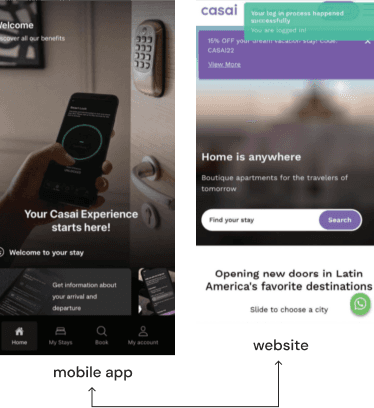
01 - Check-in & Check-out requests: The possibility of changing the check-out was really good. However they could not find where and how to request this change as an extra service.
02 - Language: Some pages of the app are not translated [by default, we should have three options: English, Spanish and Portuguese for all pages], but on some specific pages, the translation did not work or didn’t keep the previously selected language.
03 - Currency: If they do not change the currency before choosing their property, they need to go back and change it, or change it later in the payment menu.
On the Product Page, the user can change the currency from the menu while looking for a specific property. On the Summary Page and Checkout Page, the user cannot change the currency, but wants to, because these are where they see the final value of the booking and decide whether to make any changes.

02 - DEFINE
PROBLEM HYPOTHESES
After analyzing the research, we created a CSD Matrix to better understand the information we had, classify it, and develop hypotheses.
01 - If the booking process becomes simpler within the app and provides more information about the checkout process, users will gain more confidence and complete their bookings faster.
02 - Offering extra options and new payment methods during the reservation process can help make users “fall in love” with the app and complete their bookings.
03 - Allowing users the flexibility to change extra items and payment methods in the app, even after their booking is confirmed, will set Casai apart from competitors.
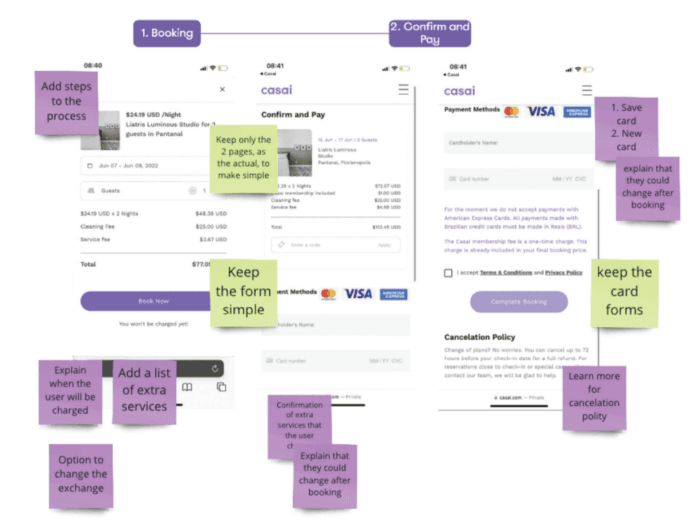
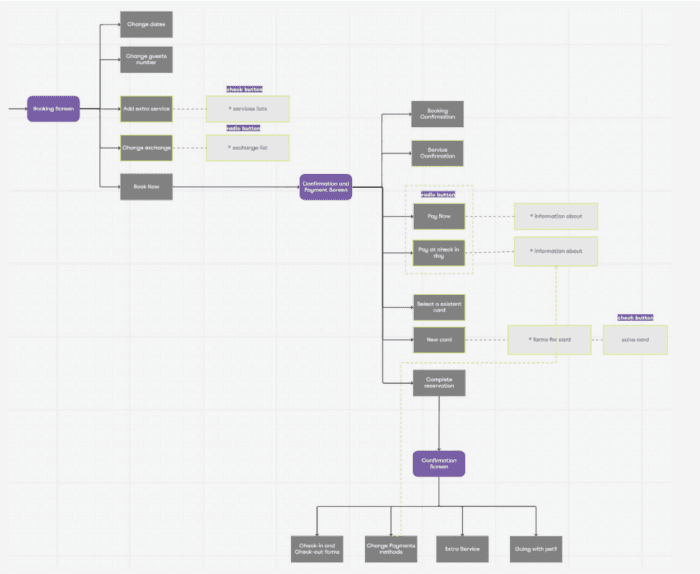
From left to right:
First image - What was working in the process in green and what we could add in purple.
Second image - New user flow following the new proposal.
SOLUTION
We used components from our design system and created additional ones as needed, based on technical constraints and project scope.
BOOK MANAGER
The first step in the checkout process after finding and selecting a stay is the booking manager. Here, users will decide their dates, number of guests, currency, and extra services.
They will also see all fees and the total cost of the selected services, displayed in their chosen currency.
Our main goal was to make the experience highly customizable, with real-time results, so guests could select what they want and see the final price, while still being able to make changes until they were ready to move forward with their chosen options.

CONFIRM & PAY
To streamline the process and keep it efficient, the second step is “Confirm & Pay.” In this step, the guest can choose their preferred payment method while still seeing a summary of their booking at the top.
Pay Now - they will be charged immediately, as indicated in the description below the toggle.
Pay at Check-In - they will be charged only after completing the check-in process. This option allows users to change the credit card to be charged up to 72 hours after check-in.

MANAGE YOUR BOOKING
The summary screen serves as the feedback screen, allowing users to confirm that everything is functioning correctly and providing important links for the next steps.

RESULTS
As expected, the adoption of the in-app checkout feature was a success. During the quarter following the launch, in-app checkout adoption reached 60%, with a 5% increase in bookings.
FURTHER IMPROVEMENTS
After the launch, we took time to gather user feedback and create minor tickets to improve the user journey. We also redesigned the final step, the Manage screen, making it more useful for users by adding additional information and redirecting them to the “My Account” section to view and manage all their bookings.